A laptop screen extender can add valuable workspace without replacing your computer or setting up a full desktop monitor. For home offices, the right model makes multitasking easier while remaining simple to store when your workday ends.
These 10 options cover common priorities including Full HD resolution, lightweight designs, triple-screen setups, USB-C connectivity, and compatibility with laptops from roughly 12 to 17.3 inches. Use the guide below to narrow the choices by desk setup, travel needs, and connection requirements.
Best 10 Laptop Screen Extenders for Home Offices Picks for 2026
Flexible Dual-Screen Choice
Funhill 14.1-inch 1080p Extender

- 14.1-inch Full HD IPS display
- 280-degree rotation and portrait mode
- Plug-and-play USB-C or HDMI setup
Best For: Users seeking an adaptable, easy-to-install second screen
Lightest Travel-Friendly Pick
Blackview 14.1-inch Triple-Screen Extender

- Ultra-light 2-pound design
- Single USB-C cable connection
- TÜV-certified eye-care features
Best For: Mobile professionals balancing triple-screen productivity with portability
Detachable Desk Setup
15.6-inch FHD Detachable Portable Monitor

- Large 15.6-inch 1080p IPS display
- Detachable stand supports desktop use
- 360-degree rotation and flexible angles
Best For: Home-office users wanting a large, versatile second display
Best Lightweight Dual-Screen Pick
Ultra-Portable 14.2-Inch FHD Extender

- 1.87-pound, 0.27-inch-thin design
- 1080p IPS display with flexible viewing angles
- No-driver setup with broad OS compatibility
Best For: Remote workers and travelers needing a lightweight second screen
Best Ultra-Light Option
Blackview 14-Inch FHD Extender

- Only 1.3 pounds and 0.17 inches thin
- 1080p IPS with 100% sRGB color gamut
- Blue-light filtering and included protective case
Best For: Traveling users seeking a lightweight, flexible second display
Best Large-Display Choice
ZUMWALT P7 15.6-Inch Triple Monitor
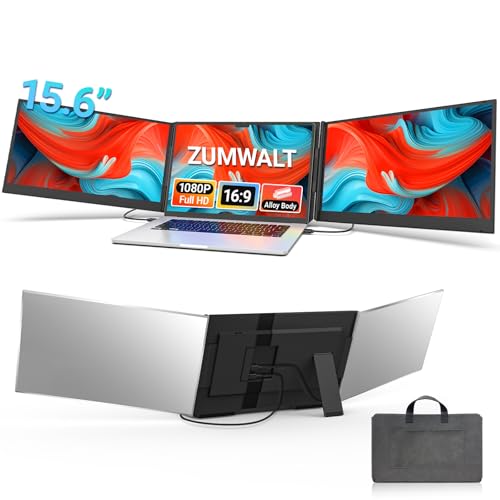
- Two spacious 15.6-inch 1080p screens
- Aluminum shell with carrying bag
- Portrait, mirrored, and extended modes
Best For: Large-screen portable productivity
Triple-Screen Powerhouse – KEFEYA 15.6-inch Triple Monitor Extender
For home offices that need a large, expansive workspace, the KEFEYA is one of the more capable laptop screen extenders for home offices. Its two 15.6-inch Full HD IPS displays can turn a compatible laptop into a triple-screen setup, with multiple display modes and adjustable picture settings.
Best For: Remote workers, programmers, stock traders, and multitaskers who want three screens from a portable setup.
Pros:
- Two 15.6-inch 1080p IPS displays with 300-nit brightness and 100% sRGB coverage
- Supports extended, mirrored, landscape, and portrait viewing modes
- Foldable 0.16-inch design includes a leather carrying bag
- Includes USB-C, HDMI-to-USB-C, and USB-A-to-USB-C cables
Cons:
- Weighs about 3.9 to 4 pounds, making it less travel-friendly than lighter models
- Mac laptops with M1, M2, or M3 chips require a separate H6 adapter
- USB-A-to-USB-C cable supplies power only
The KEFEYA stands out when screen real estate matters more than minimum weight. Confirm that your laptop has a full-featured USB-C port or suitable HDMI connectivity before buying, especially if you use a newer Mac.
Flexible Dual-Screen Choice – Funhill 14.1-inch 1080p Extender
The Funhill offers a practical way to add a second screen without installing drivers. For laptop screen extenders for home offices, its 14.1-inch 1080p IPS display, broad device compatibility, and 280-degree rotation provide useful flexibility for documents, calls, and reference material.
Best For: Home-office users who want a straightforward dual-screen setup with flexible positioning.
Pros:
- 14.1-inch Full HD IPS display with a 60Hz refresh rate
- Rotates up to 280 degrees and supports extended, duplicate, and portrait modes
- Plug-and-play connection through USB-C or HDMI with cables included
- Supports Windows, Mac including M1 through M5 models, Chrome, Linux, and selected consoles
Cons:
- HDMI connections require a separate USB-A or USB-C cable for power
- USB-C connection requires a full-featured port supporting DisplayPort or Thunderbolt
- The listed screen size is smaller than the 15.6-inch alternatives
Funhill is a sensible all-around option for a home office where easy setup and positioning matter. Check your laptop’s USB-C specifications first, or plan to use HDMI with an additional power connection.
Lightest Travel-Friendly Pick – Blackview 14.1-inch Triple-Screen Extender
Blackview focuses on portability without giving up a third display. Among laptop screen extenders for home offices, this 2-pound model is especially appealing if your workspace moves between a desk, meeting room, and coffee shop, while its one-cable USB-C connection keeps setup tidy.
Best For: Professionals who want a lightweight triple-screen setup for home working and frequent travel.
Pros:
- weighs just 2 pounds and measures 14.1 inches
- Single USB-C-to-USB-C cable connection for a cleaner setup
- FHD IPS display with 100% sRGB color coverage and built-in speakers
- TÜV Rheinland and TÜV SÜD-certified eye-care features include flicker-free and low-blue-light viewing
Cons:
- Initial driver installation takes about one minute
- One-cable operation depends on compatible full-featured USB-C hardware
- Its 14.1-inch screen is smaller than the largest options in this roundup
The Blackview is the strongest fit when carrying weight and cable clutter are major concerns. Its eye-care features also suit long spreadsheet, coding, or trading sessions, but verify compatibility and expect the brief initial driver setup.
Detachable Desk Setup – 15.6-inch FHD Detachable Portable Monitor
The detachable design makes this model useful beyond the laptop itself. For laptop screen extenders for home offices, it combines a large 15.6-inch Full HD IPS panel with a wide stand that can remain attached to a laptop or be removed for desktop use.
Best For: Home-office users who want a large second screen that can also work independently on a desk.
Pros:
- 15.6-inch 1080p IPS display with 300-nit brightness and 100% sRGB coverage
- Detachable stand supports desktop use and improves stability
- 360-degree rotation and 192-degree angle adjustment offer flexible positioning
- At 0.22 inches thick and 2.73 pounds, it remains relatively portable
Cons:
- Designed for a dual-screen setup rather than a triple-screen configuration
- HDMI setups require a separate power connection through USB-A or USB-C
- Full-featured USB-C is needed for a single-cable connection
This model is a strong choice if your home office needs a larger, stable second display but you still want to travel occasionally. Its detachable stand gives it more flexibility than extenders designed only to hang from a laptop.
Best Lightweight Dual-Screen Pick – Ultra-Portable 14.2-Inch FHD Extender
For shoppers comparing laptop screen extenders for home offices, this 14.2-inch model focuses on easy setup, portability, and a clear Full HD workspace. It supports extended, mirrored, and portrait viewing while working with laptops from 14 to 17.3 inches.
Best For: Remote workers, students, programmers, and frequent travelers who want a lightweight second screen.
Pros:
- Weighs 1.87 pounds and measures just 0.27 inches thick.
- 1080p IPS display with 300 nits brightness and a 0–226° adjustable viewing angle.
- No-driver setup with USB-C or HDMI and USB-A connection options; cables are included.
- Compatible with Windows, macOS, ChromeOS, Linux, and Android.
Cons:
- USB-C connection requires a full-function USB-C port.
- Its 14.2-inch screen may provide less viewing area than larger 15.6-inch extenders.
This is a practical choice when portability matters as much as additional screen space. Its straightforward connections and flexible viewing modes suit compact home-office setups that may also travel.
Best Triple-Screen Workspace – 15.6-Inch FHD Triple Monitor
Among laptop screen extenders for home offices, this 15.6-inch option stands out for creating a triple-display workspace. Its independent screens are designed for email, documents, calls, coding, editing, and spreadsheet work, while the included carry bag supports mobile use.
Best For: Remote professionals, traders, designers, and multitaskers who need three screens from one laptop.
Pros:
- 15.6-inch 1080p IPS display with 300 nits brightness and a 1000:1 contrast ratio.
- Creates three independent displays for side-by-side multitasking.
- Aluminum construction, adjustable stand, and 0–180° screen folding.
- Includes Smart InnovRay software with brightness, color, eye-care, and split-screen controls.
Cons:
- Weighs 3.9 pounds, making it heavier than the other listed options.
- Requires suitable video-output ports; some setups may need the separately obtained H5 cable.
- Standard M1, M2, and M3 MacBook chips are not compatible with dual-screen functionality without the specified H5-cable solution.
This model offers the most expansive workspace in the group, but buyers should verify laptop ports and Mac compatibility before ordering. It is best suited to a mostly stationary home office or users willing to carry a larger setup.
Best Ultra-Light Option – Blackview 14-Inch FHD Extender
If you want laptop screen extenders for home offices that remain easy to pack away, the Blackview SCM6 is a notably light dual-monitor option. It weighs 1.3 pounds, supports landscape and portrait modes, and fits laptops from 13 to 17 inches.
Best For: Mobile professionals and home-office users who prioritize minimal weight, eye-comfort features, and flexible device compatibility.
Pros:
- Ultra-light 1.3-pound design with a 0.17-inch-thin profile.
- 14.1-inch 1080p IPS display with 300 nits brightness, 60Hz refresh rate, and 100% sRGB coverage.
- Hardware-level blue-light filtering and TÜV SÜD certification.
- Includes USB-C, USB-C-to-USB-A, and HDMI cables, plus a protective case.
Cons:
- Its 14.1-inch panel is smaller than the 15.6-inch triple-screen model.
- HDMI setups require separate power through USB-C to USB-A.
The SCM6 is a strong fit for buyers who carry their workstation frequently but still want Full HD color and multiple display modes. Its included cables, case, and broad Windows, Mac, ChromeOS, Android, and Linux support add flexibility.
Best Overall Triple-Screen Pick – Macsecor 14-Inch FHD Triple Monitor
For shoppers comparing laptop screen extenders for home offices, the Macsecor stands out with two 14-inch FHD displays, a streamlined dual-cable setup, and support for laptops from 13 to 17.3 inches. Its built-in stand and adjustable rotation also make it practical for flexible desk arrangements.
Best For: Home-office users who want a portable triple-screen workstation with broad operating-system compatibility.
Pros:
- Two 14-inch 1080p IPS screens with blue-light filtering and anti-glare technology.
- Supports extended, mirrored, portrait, and landscape display modes.
- Built-in aluminum stand adjusts up to 90 degrees and supports 180-degree rotation.
- Includes cables and a one-year replacement warranty.
Cons:
- M1, M2, and M3 MacBooks may require an additional H5-T cable.
- Laptops without a full-featured USB-C port may need an alternate connection setup.
- At 3 pounds, it adds noticeable weight to a portable workstation.
The Macsecor is a well-rounded choice when workspace expansion, portability, and flexible viewing angles matter. Verify your laptop’s ports before ordering, especially for Apple silicon MacBooks.
Best Compact Dual-Screen Option – CIDETTY 14-Inch FHD Portable Monitor
The CIDETTY is a compact option for laptop screen extenders for home offices, pairing a 14-inch FHD IPS display with plug-and-play HDMI and USB-C connectivity. A protective case, built-in speakers, and slim 0.24-inch profile make it easy to move between home, travel, and shared workspaces.
Best For: Users seeking a slim, portable extra screen for work, presentations, entertainment, or travel.
Pros:
- 14-inch 1080p IPS screen with 178-degree viewing angles.
- Built-in speakers, blue-light filtering, and anti-glare technology.
- Includes multiple cables and a protective case.
- Supports mirror and extended display modes on compatible devices.
Cons:
- Not compatible with MacBook models using M1, M2, or M3 chips, according to the supplied notes.
- Some Surface devices with only one Type-C port are not supported.
- Full-featured USB-C or HDMI connectivity is required.
The CIDETTY offers a straightforward, travel-friendly way to add screen space without a bulky setup. Compatibility is more limited than some alternatives, so check your laptop’s ports and processor before buying.
Best Large-Display Choice – ZUMWALT P7 15.6-Inch Triple Monitor
For home-office buyers who prioritize viewing area, the ZUMWALT P7 uses two larger 15.6-inch FHD screens to create a spacious triple-monitor setup. Its aluminum shell, carrying bag, and simplified USB-C connection approach make it suited to professionals who need more workspace without a permanent desk monitor.
Best For: Multitaskers who want larger portable displays for coding, office work, presentations, or entertainment.
Pros:
- Two 15.6-inch 1080p displays provide more screen area than 14-inch models.
- 280-nit brightness and 178-degree viewing angles support comfortable viewing.
- Aluminum construction and included leather carry bag improve portability.
- Supports extended, mirrored, and portrait display modes.
Cons:
- At 4 pounds, it is heavier than the smaller Macsecor model.
- Laptops without full-featured USB-C ports may require an H5-T cable and additional connections.
- M1, M2, and M3 MacBooks require the additional cable setup noted by the manufacturer.
The ZUMWALT P7 is appealing when larger screens are more important than minimum weight. Its USB-C setup can be simple on compatible laptops, but shoppers should confirm port requirements before ordering.
How We Picked the Best Laptop Screen Extenders for Home Offices
We focused on the features that matter most in a home-office display upgrade: laptop-size compatibility, resolution, connection options, weight, thickness, mounting flexibility, and ease of setup. Most models in this roundup offer 1080p viewing, while several support dual- or triple-screen arrangements for multitasking.
Because specifications and laptop ports vary, we also considered practical details such as whether a display may require HDMI, USB-C, USB power, adapters, or more than one cable. A portable extender should fit securely, avoid excessive strain on the laptop hinge, and be easy to remove when it is not needed.
Quick Comparison
| Priority | Look for | Best suited to |
|---|---|---|
| Maximum workspace | Triple-monitor configuration | Spreadsheets, research, and multitasking |
| Simpler setup | One-cable USB-C operation | Compatible modern laptops |
| Portability | About 1.3 to 1.9 pounds and slim construction | Hybrid workers and frequent travel |
| Balanced everyday use | 14-inch or 15.6-inch 1080p IPS display | General home-office productivity |
Key Buying Factors for Laptop Screen Extenders for Home Offices
Size and Laptop Fit
Check the supported laptop width and screen range before buying. A 14-inch extender may suit many 13- to 17-inch laptops, but the attachment mechanism and bezel layout still matter. Larger 15.6-inch models can provide a more spacious view but may add weight and bulk.
Ports, Power, and Compatibility
USB-C is convenient, but not every USB-C port carries video. Confirm that your laptop supports DisplayPort Alt Mode or the required video standard. HDMI-based models may need a separate USB connection for power, and some computers require drivers or adapters. macOS, Windows, and ChromeOS support can also differ, especially for multiple external displays.
Resolution and Viewing Comfort
Full HD 1080p is a sensible baseline for documents, browser tabs, and video calls. IPS panels generally provide more consistent color and viewing angles. For long work sessions, prioritize adjustable brightness, a matte or low-glare surface, and eye-comfort features rather than focusing only on the screen count.
Portability and Stability
Weight and thickness affect whether the extender is practical beyond a permanent desk. Look for a rigid frame, secure clamps or rails, and a design that does not make the laptop difficult to open. A detachable panel can be useful when you want a second screen at home but less bulk during travel.
Who Should Buy Which Laptop Screen Extenders for Home Offices?
Choose a triple-screen model if you regularly compare documents, monitor dashboards, keep communication tools open, or work across several browser windows. These models offer the largest productivity gain but typically demand more space, cables, and compatible ports.
Choose a lightweight 14-inch extender if you work in different rooms, travel occasionally, or want an unobtrusive second display. It is often the best balance for email, writing, research, and video meetings.
Choose a 15.6-inch model if screen area matters more than minimum weight and your laptop can support the added size. Before ordering, verify the laptop’s dimensions, port capabilities, operating-system support, and whether a power adapter or hub is needed.