Photo editing is easier when your canvas, tools, previews, and reference images have room to stay visible. A laptop screen extender can add valuable workspace without requiring a full desktop monitor setup.
We selected 10 portable extenders in popular sizes and configurations, focusing on display quality, laptop compatibility, travel convenience, and the practical details photographers and editors notice most.
Best 10 Laptop Screen Extenders for Photo Editing Picks for 2026
Best for Vertical Workspace
16-Inch 1200P Triple-Screen Extender

- Dual 16-inch IPS displays with 1920×1200 resolution
- Extra 16:10 vertical space for editing panels and timelines
- Slim aluminum design with driver-free USB-C setup
Best For: Photo editors needing a spacious, high-resolution portable workstation
Best for Maximum Screen Count
15.6-Inch Quad Monitor Extender

- Creates a four-screen workspace for simultaneous applications
- Rotating side screens and a flipping top screen
- 1080P IPS display with brightness adjustment and low-blue-light mode
Best For: Designers who need extensive multitasking space
Best for Flexible Travel Setups
Detachable 15.6-Inch FHD Extender

- Supports 11+ configurations, including standalone use
- 120% sRGB gamut, HDR, and 300-nit IPS display
- Each detachable screen weighs 1.5 pounds
Best For: Traveling creatives needing adaptable screen arrangements
Best Lightweight Single-Panel Pick
KYY 15.6-Inch Portable Monitor

- 15.6-inch 1080P IPS display with HDR
- Lightweight 1.7-pound body and protective cover
- USB-C and mini-HDMI connectivity for flexible use
Best For: Mobile editors wanting a simple, portable second screen
Best Lightweight Color Pick
Blackview 14.1-Inch Triple Screen Extender

- 100% sRGB Full HD IPS display
- Weighs 2 pounds
- Single USB-C connection
Best For: Traveling photo editors seeking a lightweight, color-focused extra display
Best Large-Screen Flexibility
Anyking 15.6-Inch Detachable Extender

- 15.6-inch Full HD IPS display
- 100% color gamut rating with matte finish
- Adjustable stand and VESA support
Best For: Photo editors wanting a larger, flexible display for desk or travel use
Best Stable Triple-Screen Setup
Vixtan 14-Inch FHD Triple-Screen Extender

- 100% sRGB Full HD IPS panel
- Reinforced adjustable stand
- Includes USB-C and HDMI cables
Best For: Creators needing a stable triple-screen workflow across multiple platforms
Best Viewing Flexibility
Synnov 15.6" Triple Monitor Extender

- 178-degree viewing angle on a 1080p IPS display
- Supports portrait, extend, and mirror modes
- Lightweight aluminum design with travel accessories
Best For: Traveling photo editors who need flexible screen positioning
Best Streamlined Setup
ZUMWALT P7 15.6" Triple Monitor
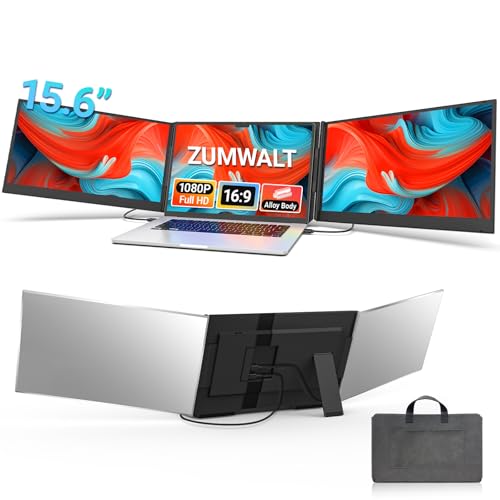
- Two 15.6-inch 1080p displays expand the editing workspace
- Two USB-C cables simplify compatible setups
- Slim aluminum body includes a carry bag
Best For: USB-C laptop users seeking a cleaner portable setup
Best for Vertical Workspace – 16-Inch 1200P Triple-Screen Extender
For shoppers comparing laptop screen extenders for photo editing, this model stands out with two 16-inch IPS displays, 1920×1200 resolution, and a 16:10 aspect ratio. The added vertical space can make timelines, tool panels, documents, and image previews easier to manage across a triple-screen setup.
Best For: Photo editors and content creators who want larger 16:10 screens and a spacious portable workstation.
Pros:
- Dual 16-inch IPS screens provide 1920×1200 resolution and extra vertical space.
- 350-nit brightness, 178-degree viewing angles, and a stated 100% color gamut support detailed visual work.
- Ultra-slim 6.5mm aluminum screens and an open-frame design improve portability and laptop compatibility.
- Two USB-C cables provide a driver-free setup when the laptop has two full-featured USB-C ports.
Cons:
- Requires two full-featured USB-C ports for the simplest setup.
- At 4.6 pounds, it is heavier than a single portable monitor.
- The glossy finish may be less suitable for brightly lit editing spaces.
This is a strong choice when screen area and vertical resolution matter more than minimizing weight. Verify your laptop’s USB-C video and power support before buying.
Best for Maximum Screen Count – 15.6-Inch Quad Monitor Extender
This quad-monitor laptop extender is designed for editors who prefer to keep more tools and reference windows visible at once. Its 15.6-inch 1080P IPS display, independent or synchronized modes, and rotating screens create a flexible multi-screen arrangement for photo-editing workflows.
Best For: Designers and multitaskers who prioritize four-screen workspace flexibility over compact simplicity.
Pros:
- Supports multi-screen synchronization or independent display modes.
- 1080P FHD IPS display includes adjustable brightness and low-blue-light protection.
- Left and right screens rotate 0–360 degrees, while the top screen flips up to 300 degrees.
- One-line control connects three screens, with a separate power cable required for the top screen.
Cons:
- The 1080P resolution is less detailed than higher-resolution options for close image inspection.
- Compatibility is specified for 13.6–17.3-inch laptops, Windows 10 and later, and macOS models from 2019 onward.
- The multi-screen design may be less portable than a single detachable monitor.
Choose this model if your photo-editing process benefits from keeping palettes, references, and applications open simultaneously. Its rotating design also helps adapt the layout to different desk positions.
Best for Flexible Travel Setups – Detachable 15.6-Inch FHD Extender
For photo editors who move between home, office, and travel locations, this detachable Wixzet extender offers more configuration choices than a fixed dual-screen accessory. Its 15.6-inch FHD IPS display, 120% sRGB gamut, HDR support, and standalone-monitor capability make it adaptable to different editing and presentation setups.
Best For: Traveling creatives who want triple-screen, dual-screen, and standalone-monitor options in one system.
Pros:
- Detachable screens support 11+ configurations, including triple-screen and standalone use.
- 15.6-inch 1080P IPS display offers a stated 120% sRGB gamut, HDR, and 300-nit brightness.
- Each detachable screen weighs 1.5 pounds and includes a carrying case.
- Supports Windows, macOS, ChromeOS, Linux, Android, and DeX, with plug-and-play connections.
Cons:
- Two full-featured USB-C ports are needed for the simplest dual-USB-C setup.
- With HDMI, an additional USB-A-to-USB-C cable is needed for power.
- The complete system weighs 5 pounds, reducing its travel advantage compared with a single monitor.
This is the most adaptable option in the group for photographers who need a configurable mobile workspace. Check your laptop’s available video-output ports and power support before purchase.
Best Lightweight Single-Panel Pick – KYY 15.6-Inch Portable Monitor
The KYY K3 is a straightforward option for shoppers seeking laptop screen extenders for photo editing without the bulk of a multi-panel system. Its 15.6-inch 1080P IPS display, HDR support, matte finish, and 1.7-pound body can add a practical second screen for tools, references, or image previews.
Best For: Mobile photo editors who want a lightweight, single-screen companion monitor.
Pros:
- 15.6-inch 1920×1080 IPS display with HDR and a 178-degree viewing angle.
- Lightweight 1.7-pound design with a 0.3-inch profile and included protective cover.
- Two full-function USB-C ports and mini-HDMI support laptops and other devices.
- Matte screen, blue-light filtering, flicker-free operation, and built-in speakers add convenience.
Cons:
- 1080P resolution provides less workspace and detail than the 1200P option.
- It adds one external display rather than creating a built-in triple- or quad-screen setup.
- USB-C one-cable operation depends on the connected device supporting compatible video output.
The KYY is a sensible pick when portability and simple connectivity matter most. It is especially useful as a compact second display for editing tools or reference material rather than as a complete multi-screen workstation.
Best Lightweight Color Pick – Blackview 14.1-Inch Triple Screen Extender
For photographers who need extra workspace while traveling, this Blackview model is one of the more portable laptop screen extenders for photo editing. Its 14.1-inch Full HD IPS display provides 100% sRGB coverage, while the single USB-C connection helps keep a mobile editing setup tidy.
Best For: Mobile photo editors who prioritize low weight, accurate sRGB color, and a simple triple-screen setup.
Pros:
- 100% sRGB coverage and 1920×1080 resolution support color-conscious editing.
- At 2 pounds, it is relatively easy to carry for travel and remote work.
- Single USB-C connection, portrait mode, and extend or mirror options add flexibility.
- TÜV-certified flicker-free, low-blue-light features are useful during long sessions.
Cons:
- The 14.1-inch screen is smaller than the 15.6-inch alternative in this roundup.
- The supplied notes indicate that initial driver installation may be required.
- Its listed 300 brightness level and glossy finish may be less convenient in bright environments.
This is a strong choice when portability and color coverage matter more than maximum screen size. It suits photographers who want editing tools, references, and file windows visible without carrying a heavier monitor.
Best Large-Screen Flexibility – Anyking 15.6-Inch Detachable Extender
This Anyking model gives photo editors more physical screen area than many compact extenders. Its 15.6-inch Full HD IPS panel has a matte finish, 100% color gamut rating, and adjustable stand, making it a practical option among laptop screen extenders for photo editing at a desk or on the road.
Best For: Editors who want a larger portable panel, flexible positioning, and compatibility with laptops, phones, and consoles.
Pros:
- 15.6-inch 1920×1080 IPS display offers a generous workspace for editing tools and previews.
- 100% color gamut rating, 330cd/m² brightness, and matte finish support comfortable viewing.
- Landscape, portrait, mirror, extend, and rotated modes accommodate different workflows.
- Built-in stand supports height adjustment, 90-degree rotation, and 75×75mm VESA mounting.
Cons:
- The larger 15.6-inch design may be less convenient to pack than smaller extenders.
- HDMI setups require a separate USB-A power connection rather than one cable.
- The supplied details do not specify the product’s exact weight.
Choose this Anyking display if a larger canvas and positioning options are central to your workflow. Its matte panel and adjustable support make it especially suitable for a semi-permanent home-office setup that can still travel when needed.
Best Stable Triple-Screen Setup – Vixtan 14-Inch FHD Triple-Screen Extender
The Vixtan extender is designed for photographers who want a true three-screen laptop workspace without a desktop monitor. Its 14-inch Full HD IPS panel combines 100% sRGB color, anti-glare treatment, and a reinforced adjustable stand, making it a capable choice among laptop screen extenders for photo editing.
Best For: Creators who need triple-screen multitasking, broad operating-system compatibility, and a stable adjustable attachment.
Pros:
- 100% sRGB coverage, 300 brightness, and Full HD resolution suit color-conscious creative work.
- Supports extended, mirrored, and portrait modes for editing panels, previews, and references.
- Reinforced springs, non-slip pads, rear support, and multi-level adjustment are designed for stability.
- Includes multiple cables and supports Windows, macOS, ChromeOS, Android, Linux, and consoles.
Cons:
- M1, M2, and M3 MacBooks support only a single screen without a DisplayLink adapter.
- The glossy finish may reflect more light than a matte display.
- The supplied notes warn that a 5V/3A-or-higher adapter may be needed for flicker or low brightness.
This model stands out for users who value a secure, adjustable attachment and broad device support. Confirm your laptop’s display limitations and power arrangement before buying, particularly if you use an M-series MacBook.
Best Color-Control Features – 15.6" FHD Triple Screen Extender
For photographers and creatives looking for laptop screen extenders for photo editing, this model combines a 15.6-inch 1080p IPS display with software controls for brightness, contrast, color temperature, and Eye Care Mode. Its triple-screen setup can also keep editing tools, reference images, and communication apps visible at once.
Best For: Photo editors who want display-adjustment controls and a spacious portable multitasking setup.
Pros:
- 15.6-inch 1920×1080 IPS display with 300-nit brightness and a 1000:1 contrast ratio.
- Built-in software provides brightness, contrast, color-temperature, and Eye Care Mode adjustments.
- Aluminum body, adjustable stand, included carry bag, and 0.18-inch slim profile support travel use.
- Offers extend, mirror, and second-screen modes without driver installation.
Cons:
- Requires suitable video outputs; some configurations need the separately obtained H5 cable.
- Standard M1, M2, and M3 MacBooks are not compatible with dual-screen functionality without the specified workaround.
This is the strongest fit of the three for users who want more direct control over viewing conditions while editing. Confirm your laptop’s ports and processor compatibility before buying.
Best Viewing Flexibility – Synnov 15.6" Triple Monitor Extender
This Synnov model is a practical choice among laptop screen extenders for photo editing when flexible positioning matters. Its 15.6-inch 1080p IPS panel offers a 178-degree viewing angle, while extend, mirror, and portrait modes help organize editing tools and reference material.
Best For: Mobile editors who value wide viewing angles, portrait orientation, and a lightweight aluminum design.
Pros:
- 15.6-inch FHD IPS screen with a 178-degree viewing angle and adjustable brightness.
- Supports extend, mirror, and portrait modes for adaptable workspace layouts.
- At about 4 pounds and 0.19 inches thick, it is designed for travel.
- Includes cables, power adapter, and leather carry bag, with no driver required.
Cons:
- Requires at least one full-featured USB-C port for compatibility.
- Brightness is listed at 280 nits, which may be less suitable for demanding brightness-critical work.
- M1, M2, and M3 MacBooks are noted as incompatible because of chip limitations.
Synnov emphasizes portability and viewing flexibility rather than advanced color-management features. It is worth considering for on-the-go editing, provided your laptop meets the USB-C requirements.
Best Streamlined Setup – ZUMWALT P7 15.6" Triple Monitor
The ZUMWALT P7 is one of the more straightforward laptop screen extenders for photo editing if your laptop supports full-function USB-C. Two 15.6-inch 1080p displays expand the workspace for palettes, timelines, references, and other tools, while the included cables and bag make the unit easier to use away from a desk.
Best For: Editors with compatible USB-C laptops who want a clean, portable triple-screen arrangement.
Pros:
- Uses two USB-C-to-USB-C cables on supported devices to reduce cable clutter.
- Provides two 15.6-inch 1080p displays with 280-nit brightness and 178-degree viewing angles.
- Ultra-slim aluminum construction weighs about 4 pounds and includes a leather carry bag.
- Supports extend, mirror, and portrait modes with plug-and-play operation on compatible setups.
Cons:
- Devices without full-featured USB-C, and M1/M2/M3 MacBooks, may require an additional H5-T cable and a more involved connection.
- The glossy finish may produce reflections in bright environments.
This model makes the most sense when minimizing setup complexity is a priority and your laptop already has the required ports. Check compatibility carefully, especially for Macs and systems relying on HDMI or USB-A.
How We Picked the Best Laptop Screen Extenders for Photo Editing
We compared these Laptop Screen Extenders for Photo Editing by looking at screen resolution, panel type, connection options, mounting flexibility, weight, and stated laptop-size compatibility. We also considered whether each model supports one or two added displays, whether it can detach for separate use, and how easily it travels.
Portable extenders are not automatically color-accurate photo monitors, so buyers should verify color coverage, calibration support, brightness, and viewing-angle claims before treating one as a primary editing display. The selections here are best viewed as productivity upgrades that can provide more workspace while editing on the road.
Quick Comparison
| What to Compare | Why It Matters |
|---|---|
| Screen size and resolution | 15.6-inch 1080p models offer familiar workspace; 1200p or larger panels may provide more vertical room. |
| Single, dual, or triple-screen design | More displays improve multitasking but add weight, power demands, and setup complexity. |
| Connection method | USB-C may simplify setup, while HDMI and USB-A options can improve compatibility. |
| Portability | Weight, thickness, a protective cover, and detachable panels matter for frequent travel. |
| Color and panel quality | IPS viewing angles and documented color specifications are useful for image work. |
Key Buying Factors for Photo Editing
Color, Resolution, and Brightness
Look for an IPS display with clear color specifications rather than relying only on phrases such as “FHD” or “eye care.” Full HD is adequate for palettes and timelines, but higher resolution can make detailed images and tool panels more comfortable. For serious color-critical work, use a calibrated primary monitor whenever possible.
Compatibility and Power
Check whether your laptop’s USB-C port supports video output; a standard USB-C charging or data port may not. Some extenders require HDMI, USB power, drivers, or multiple cables. Confirm operating-system support and available ports before ordering, especially for MacBooks, thin Windows laptops, and machines with only USB-C.
Fit, Viewing Angle, and Ergonomics
Compare the extender’s stated laptop range with your computer’s screen size and chassis thickness. A secure fit matters when traveling, while adjustable hinges or detachable panels help position screens at a comfortable angle. Triple-screen designs can be productive but may feel wide on small desks.
Who Should Buy Which Laptop Screen Extenders for Photo Editing?
- Frequent travelers: Choose an ultra-light, slim model with a cover and simple one-cable setup.
- Editors who need the most workspace: Consider a triple-screen or quad-monitor design, provided your laptop can supply the required power and video connections.
- Small-laptop owners: Prioritize models with broad fit ranges and lightweight detachable screens.
- Color-conscious photographers: Favor documented IPS and color specifications, then calibrate the display if supported. Keep a dedicated calibrated monitor for final color decisions.
- Occasional multitaskers: A single 15.6-inch 1080p extender usually offers the best balance of price, setup speed, and usable workspace.
Before buying, verify the exact ports, included cables, supported operating system, laptop-size range, and return policy. Those details often determine whether a portable extender works smoothly in your editing workflow.